QUtilities
A useful set of helper utilities specifically involving Qiskit-Metal entities.
- class QUtilities
Bases:
object- static calc_die_coords(chip_dim, die_dim, num_die)
Calculates centre coordinates (x, y) of multiple die on a chip.
- Parameters:
chip_dim – Tuple containing chip dimensions (x, y) Qiskit Metal style - e.g. “20mm”
die_dim – Tuple containing die dimensions (x, y) Qiskit Metal style - e.g. “4.0mm”
num_die – Tuple containing the number of die (num_x, num_y) in x and y
- Returns:
A list of tuples of floats containing all die centre positions (relative to (0,0) in the chip centre) in units of meters. Sorted, ascending up each column from bottom left to top right.
- static calc_filleted_path(points, rFillet, precision, resolution=4)
Returns the coordinates of a given path after filleting (like in Qiskit-Metal).
- Parameters:
points – Numpy array of points given as (x,y) on every row.
rFillet – Radius of fillets on every corner.
precision – The numeric precision in which to calculate bad fillets taken usually as design.template_options.PRECISION
- Returns:
List of points (x,y) for the points defining the filleted path.
- static calc_length_of_path(design, component_name, trace_name='')
VGives the total length of a path in Qiskit metal units.
- Parameters:
design (qiskit_metal.designs.DesignPlanar) – Qiskit metal design.
component_name (str) – Name of the QComponent in the design.
trace_name (str, optional) – If provided, then the path given by the trace_name is selected. Otherwise, the default path (typically called ‘trace’ in normal wiring/routing objects) is selected.
- Returns:
Total length of path as a float in Qiskit metal design units.
- static calc_lines_and_fillets_on_path(points, rFillet, precision)
Returns the line segments and curved fillets on a given path of points.
- Parameters:
points – Numpy array of points given as (x,y) on every row.
rFillet – Radius of fillets on every corner.
precision – The numeric precision in which to calculate bad fillets taken usually as design.template_options.PRECISION.
- Returns:
The function returns list of segments each represented as dictionaries.
- Straight segments have the keys:
’start’ - Starting point of line segment
’end’ - Ending point of line segment
’dir’ - Unit-vector of the direction of the line segment
’dist’ - Length of the line segment
- Curved segments (i.e. ones with fillets) have the keys:
’start’ - Starting point of line segment
’end’ - Ending point of line segment
’centre’ - Centre of the circle drawing the fillet arc
- ’angleStart’ - Starting angle (on Cartesian plane) of the fillet arc
(in radians) on the corner (not from the centre)
- ’angleDelta’ - Angle traversed by the fillet arc (in radians)
using the typical polar angle direction convention in R2
’dist’ - Arclength of the fillet
- static calc_points_on_path(dists, design, component_name, trace_name='', trace_name_gap='', dists_are_fractional=False)
Returns the points along a path taking into account the curved edges (i.e. fillets).
- Parameters:
dists – List of raw distances (or fractional distances from 0 to 1 if dists_are_fractional is made True) along the path. If dists is given as a single value, then dists_are_fractional is ignored, and the returned path will be a bunch of points spaced by the value given by dists. Units are in Qiskit-Metal design units (when not fractional).
component_name – Name of the QComponent in the design
trace_name (optional) – If provided, then the path given by the trace_name is selected. Otherwise, the default path (typically called ‘trace’ in normal wiring/routing objects) is selected.
trace_name_gap (optional) – If provided, then the returned gap width is given by the trace_name_gap entity. Otherwise, the default path (typically called ‘cut’ in normal wiring/routing objects) is taken for the gap width.
dists_are_fractional (bool, optional) – (Defaults to True) If True, then the argument dists is taken as a list of fractional distances from 0 to 1.
- Returns:
final_pts - Numpy array of coordinates along the path given as (x,y) on every row.
normals - Numpy array of unit-vectors for the right-hand normal vector for every point in final_pts given as (nx, ny) on every row.
width - CPW trace width.
gap - CPW trace gap.
total_dist - Total length of path.
- Return type:
Tuple (final_pts, normals, width, gap, total_dist) where
Notes
the units in the returned values are in Qiskit-Metal design units…
- static create_even_spacing_along_line_1d(start, end, n, inset_factor=0.2)
Generate n evenly spaced points along a 1D line segment with optional insets at both ends.
If n is 1, the single point returned is the midpoint of the line segment.
- Parameters:
start (float) – Start coordinate of the line segment.
end (float) – End coordinate of the line segment.
n (int) – Number of points to generate along the line.
inset_factor (float, optional) – Fraction of spacing to inset from each end. Default is 0.2.
- Returns:
List of n coordinates evenly spaced along the line segment.
- Return type:
list of float
- static crop_design(design, border_mm=0.4, center_mm=None, dimensions_mm=None, rebuild=True)
- static get_RFport_CPW_coords_Launcher(design, qObjName, len_launch=2e-05, unit_conv_extra=1)
Computes the coordinates for the coplanar waveguide (CPW) pads of a launcher associated with an RF port.
- Parameters:
design – Qiskit Metal design object containing the components.
qObjName (str) – Name of the RF port component (must be a LaunchpadWirebond).
len_launch (float, optional) – Length of the CPW launch section. Default is 20e-6 meters.
unit_conv_extra (float, optional) – Additional unit scaling factor. Default is 1.
- Returns:
launchesA (list of list of float): List of four 2D coordinates for the first CPW pad polygon.
launchesB (list of list of float): List of four 2D coordinates for the second CPW pad polygon.
vec_perp (np.ndarray): 2D vector perpendicular to the CPW propagation direction.
- Return type:
A tuple containing
- Raises:
AssertionError – If the specified component is not a LaunchpadWirebond.
Notes
Uses _get_LauncherWB_params to obtain the origin, direction, width, and gap of the CPW.
Coordinates are returned in the design’s unit system, optionally scaled by unit_conv_extra.
The CPW polygons are defined relative to the origin and oriented along the launch direction.
- static get_RFport_CPW_coords_Route(design, qObjName, pin_name, len_launch=2e-05, unit_conv_extra=1)
Computes the coordinates for the a coplanar waveguide (CPW) port at the start of a CPW for a given component pin.
- Parameters:
design – Qiskit Metal design object containing the components.
qObjName (str) – Name of the component containing the RF port pin.
pin_name (str) – Name of the pin on the component for which to compute CPW coordinates.
len_launch (float, optional) – Length of the CPW launch section. Default is 20e-6 meters.
unit_conv_extra (float, optional) – Additional unit scaling factor. Default is 1.
- Returns:
launchesA (list of list of float): List of four 2D coordinates for the first CPW pad polygon.
launchesB (list of list of float): List of four 2D coordinates for the second CPW pad polygon.
vec_perp (np.ndarray): 2D vector perpendicular to the CPW propagation direction.
- Return type:
A tuple containing
Notes
Uses _get_Route_params to obtain the origin, launch direction, width, and gap of the CPW.
Coordinates are returned in the design’s unit system, optionally scaled by unit_conv_extra.
The CPW polygons are defined relative to the origin and oriented along the launch direction.
- static get_RFport_CPW_groundU_Launcher_inplane(design, qObjName: str, thickness_side: float = 2e-05, thickness_back: float = 2e-05, separation_gap: float = 0.0, unit_conv_extra: float = 1)
Computes the in-plane “U”-shaped ground polygon coordinates for a coplanar waveguide (CPW) launcher component. Used to connect ground either side of a CPW.
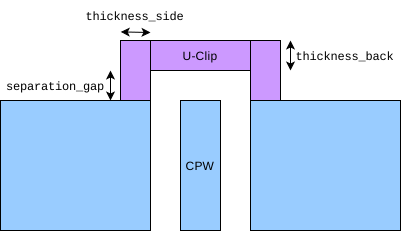
Parameters used in the U-clip
Note
The polygon is oriented relative to the CPW launch direction and perpendicular vector.
Coordinates are scaled by unit_conv_extra.
- Parameters:
design (QDesign) – Qiskit Metal LaunchpadWirebond object containing the components.
qObjName (str) – Name of the launcher component.
thickness_side (float) – Distance the U-clip, in metres, goes into the ground plane from the edge. Defaults to 20e-6.
thickness_back (float) – Thickness of the furthest section from the chip (but also parallel with the chip) in metres. Defaults to 20e-6
separation_gap (float) – Distance of the section parallel with the chip from the edge of the chip in metres. The default value is set to zero whereupon, it will use the gap distance of the CPW.
unit_conv_extra (float) – Additional unit scaling factor. Default is 1.
- Returns:
coords – List of 8 coordinates defining the vertices of the U-shaped ground polygon in 2D.
- Return type:
np.ndarray
- static get_RFport_CPW_groundU_Route_inplane(design, route_name: str, pin_name: str, thickness_side: float = 2e-05, thickness_back: float = 2e-05, separation_gap: float = 0.0, unit_conv_extra=1)
Computes the in-plane “U”-shaped ground polygon coordinates for a coplanar waveguide (CPW) route component.
Note
The polygon is oriented relative to the CPW launch direction and perpendicular vector.
Coordinates are scaled by unit_conv_extra.
Type-checking for the routed component is not enforced (TODO).
Parameters used in the U-clip
- Parameters:
design (QDesign) – Qiskit Metal LaunchpadWirebond object containing the components.
route_name (str) – Name of the routed component.
pin_name (str) – Name of the pin used to determine the CPW start point.
thickness_side (float) – Distance the U-clip, in metres, goes into the ground plane from the edge. Defaults to 20e-6.
thickness_back (float) – Thickness of the furthest section from the chip (but also parallel with the chip) in metres. Defaults to 20e-6
separation_gap (float) – Distance of the section parallel with the chip from the edge of the chip in metres. The default value is set to zero whereupon, it will use the gap distance of the CPW.
unit_conv_extra (float) – Additional unit scaling factor. Default is 1.
- Returns:
coords – List of 8 coordinates defining the vertices of the U-shaped ground polygon in 2D.
- Return type:
np.ndarray
- static get_comp_bounds(design, objs, units_metres=False)
Compute the axis-aligned bounding box for one or more Qiskit Metal components.
This function inspects the path and poly geometries of each component and returns the minimum and maximum x/y extents. For path geometries, the bounds are expanded by half the path width. If a component has no geometry (e.g., abstract components such as junctions), its pos_x and pos_y options are used as a fallback.
- Parameters:
design (qiskit_metal.designs.DesignPlanar) – The Qiskit Metal design containing the components and geometry tables.
objs (str or list of str) – One or more component names whose bounding region will be computed. A single component may be given as a string.
units_metres (bool, optional) – If True, the returned bounds are converted to metres using the design’s unit scale. If False (default), the bounds are returned in design units.
- Returns:
(min_x, min_y, max_x, max_y)representing the bounding extents of the component(s).- Return type:
A tuple in the form
- Raises:
ValueError – If none of the components contain geometry or valid positional data, so that no bounding box can be computed.
- static get_cpw_resonator_length(f0_Hz, resonator_type='quarter', cpw_width=1e-05, cpw_gap=6e-06, substrate_thickness=0.0005, film_thickness=2e-07)
Calculate the physical length of a CPW resonator for a given target frequency.
- Parameters:
f0_Hz (float) – Target resonant frequency in Hz.
resonator_type (str, optional) – Type of resonator: “quarter”, “half”, or “full”. Defaults to “quarter”.
cpw_width (float, optional) – Width of the CPW center conductor in meters. Defaults to 10e-6.
cpw_gap (float, optional) – Gap between CPW center and ground in meters. Defaults to 6e-6.
substrate_thickness (float, optional) – Thickness of the substrate in meters. Defaults to 500e-6.
film_thickness (float, optional) – Thickness of the superconducting film in meters. Defaults to 200e-9.
- Returns:
Physical length of the resonator in meters.
- Return type:
float
- static get_metals_in_layer(design, layer_id, **kwargs)
Partitions unique conductors from a layer in a Qiskit-Metal design object.
If the particular layer has fancy PVD evaporation steps, the added metallic layer will account for said steps and merge the final result. In addition, all metallic elements that are contiguous are merged into single blobs.
- Parameters:
design – Qiskit-Metal design object
layer_id – The index of the layer from which to take the metallic polygons. If this is given as a LIST, then the metals in the specified layer (0 being ground plane) will be fused and then added into COMSOL.
**kwargs –
- restrict_rect (optional):
List highlighting the clipping rectangle [xmin,ymin,xmax,ymax]
- resolution (optional):
Defaults to 4. This is the number of points along a curved section of a path object in Qiskit-Metal.
- threshold (optional):
Defaults to -1. This is the threshold in metres, below which consecutive vertices along a given polygon are combined into a single vertex. This simplification helps with meshing as COMSOL will not overdo the meshing. If this argument is negative, the argument is ignored.
- fuse_threshold (optional):
Defaults to 1e-12. This is the minimum distance between metallic elements, below which they are considered to be a single polygon and thus, the polygons are merged with the gap filled. This accounts for floating-point errors that make adjacent elements fail to merge as a single element, due to infinitesimal gaps between them.
- evap_mode (optional):
Defaults to ‘separate_delete_below’. These are the methods upon which to separate or merge overlapping elements across multiple evaporation steps. See documentation on PVD_Shadows for more details on the available options. If set to
None, then the plain mask/metallic region is taken with no regard to the PVD profiles.- group_by_evaporations (optional):
Defaults to False. If set to True, if elements on a particular evaporation step are separated due to the given evap_mode, they will still be selected as a part of the same conductor (useful for example, in capacitance matrix simulations).
- evap_trim (optional):
Defaults to 20e-9. This is the trimming distance used in certain evap_mode profiles. See documentation on PVD_Shadows for more details on its definition.
- multilayer_fuse (optional):
Defaults to False. Flattens everything into a single layer (careful when using this with evap_mode).
- smooth_radius (optional):
Defaults to 0. If above 0, then the corners of the metallic surface will be smoothed via this radius. Only works if multilayer_fuse is set to True.
- ground_cutout (optional):
MUST BE SPECIFIED if layer_id is 0. It is a tuple (x1, x2, y1, y2) for the x and y bounds
- Returns:
metal_polys_all All separate metallic islands
metal_sel_ids Selection indices for each of the metallic islands (mostly relevant when using group_by_evaporations)
- Return type:
A tuple containing
Notes
everything is in METRES
- static get_perimetric_polygons(design, comp_names, **kwargs)
Returns the perimetric polygons of specified components in a design.
- Parameters:
design – Qiskit Metal design object containing components.
comp_names (list of str) – Names of components to extract polygons for.
**kwargs – Optional keyword arguments. threshold (float): Currently unused. Default is -1. resolution (int): Resolution for getting net coordinates. Default is 4. metals_only (bool): If True, only include metal (non-subtract) geometries. unit_conv (float): Multiplier to convert units (default from QUtilities.get_units(design)). fuse_threshold (float): Tolerance for fusing nearby polygons. Default is 1e-12. restrict_rect (list or None): Rectangular bounding box [xmin, ymin, xmax, ymax] to restrict polygons.
- Returns:
List of polygons representing the perimetric geometry of the requested components, in design units scaled by unit_conv. Returns None if no geometries are found.
- Return type:
list of shapely.geometry.Polygon
- Raises:
AssertionError – If a name in comp_names does not exist in design.components.
- static get_units(design)
Convert the Qiskit Metal design unit string into a numeric scale factor.
This utility reads the spatial unit specification from the provided Qiskit Metal design object (e.g., “mm”, “um”, “nm”) and returns the corresponding multiplier for converting values expressed in that unit into meters.
- Parameters:
design (qiskit_metal.designs.DesignPlanar) – Qiskit Metal design object
specification. (from which to retrieve the unit)
- Returns:
Multiplicative scale factor that converts the design’s spatial units into meters.
- Return type:
float
- Raises:
AssertionError – If the design reports an unrecognized unit string.
- static is_string_or_list_of_strings(var)
Check if the input is a string or a list of strings.
- Parameters:
var – The variable to check.
- Returns:
True if var is a string or a list of strings, False otherwise.
- Return type:
bool
- static parse_value_length(strVal: str | float | int)
Parse a length value with units and convert it to meters.
This function interprets strings representing lengths (e.g., “5mm”, “12 um”) by parsing the numeric portion and applying the correct scale factor. It returns the length expressed in meters.
- Supported units:
mm → 1e-3 m
um → 1e-6 m
nm → 1e-9 m
pm → 1e-12 m
fm → 1e-15 m
m → 1 m (base unit)
- Parameters:
strVal (str | float | int) – Length value to parse. May be a string with units or a raw numeric value.
- Returns:
value (float) – The value converted to meters - returned if successful.
error (str) – Returns string unchanged if the format is invalid and no unit can be parsed (fallback case).
- Raises:
AssertionError – If the string is too short to contain meaningful units: or appears malformed.
- static place_launchpads(design, cpw_gap, cpw_width, die_origin, die_dimension, die_number=None, dimension='600um', inset='0um', taper='300um', lead_length='25um', print_checks=True)
Function for calculating launchpad parameters, placing launchpads on the design, and returning launchpad objects as a tuple containing the left and right launchpads of each die as (lp_L, lp_R).
- Inputs:
design: Qiskit Metal design object cpw_gap: transmission line gap as string with units (e.g. “5um”) cpw_width: transmission line central conductor width as string with units (e.g. “5um”) die_origin: centre coordinates of die as tuple (float(x), float(y)) in units of meters die dimension: tuple containing die dimensions (x, y) in units of meters die_number: die number (int) for launchpad object naming (defaults to None) dimension: horizontal length of launchpad as string with units (defaults to “600um”) inset: distance from edge of die to start of launchpad gap in x as a string with units (defaults to “0um”) taper: length of taper from launchpad to transmission line as a string with units (defaults to “300um”) print_checks: flag if user wants to print statements after launchpads are written to design (defaults to True)
- Returns:
tuple containing the LaunchpadWirebond objects (lp_L, lp_R)
- Return type:
launchpad_objects
- static place_markers(design, die_origin, die_dim, die_index, marker_type='cross')
Function to place dicing markers on a multi-die chip.
- Parameters:
design – qiskit metal design
die_origin – tuple containing die origin (x, y) as float in meters
die_dim – die dimensionsion as a yuple (x, y) containing strings with units
die_index – die number for currently placing markers
marker_type (optional) – marker type, currently only supports cross markers (defaults to “cross”)
- static place_resonators_hanger(design, gap, width, num_resonators, frequencies, die_origin, die_dimension, die_index, launchpad_extent, feedline_upscale=1.0, film_thickness='100nm', coupling_gap='20um', transmission_line_y='0um', launchpad_to_res='300um', res_shift_x='225um', min_res_gap='150um', res_vertical='1500um', chip_name='main', LC_calculations=True, print_statements=True, fillet='85um', radius='100um', meander_method='qiskit_metal')
Place multiple hanger-mode quarter-wavelength resonators on a multi-die chip.
Resonators are capacitively coupled to a shared transmission line with a 10 µm ground pocket. Lengths, start and end positions are automatically calculated based on frequencies, number of dies, number of resonators, and launchpad properties. Optional capacitance and inductance calculations can be performed.
- Parameters:
design (Qiskit Metal Design) – Qiskit Metal design object.
gap (str or list of str) – Transmission line gap (e.g., “5um”).
width (str or list of str) – Transmission line central conductor width (e.g., “5um”).
num_resonators (int) – Number of resonators per die.
frequencies (list of float) – Resonator frequencies in Hz; length must match num_resonators.
die_origin (tuple of float) – Die center coordinates in meters (x, y).
die_dimension (tuple of float) – Die dimensions in meters (x, y).
die_index (int) – Die number used for naming resonators.
launchpad_extent (float) – Total width of launchpad including inset from die edge, in meters.
feedline_upscale (float, optional) – Scaling factor for feedline gap/width. Defaults to 1.0.
film_thickness (str, optional) – Film thickness (e.g., “100nm”). Defaults to “100nm”.
coupling_gap (str, optional) – Ground gap between transmission line and resonator coupling. Defaults to “20um”.
transmission_line_y (str, optional) – Y-position relative to die center. Defaults to “0um”.
launchpad_to_res (str, optional) – Min gap between resonator start pin and launchpad. Defaults to “200um”.
res_shift_x (str, optional) – Manual horizontal shift along feedline. Defaults to “225um”.
min_res_gap (str, optional) – Minimum gap between resonators. Defaults to “150um”.
res_vertical (str, optional) – Vertical extent of resonator meanders. Defaults to “1500um”.
chip_name (str, optional) – Chip name. Defaults to “main”.
LC_calculation (bool, optional) – Calculate capacitance/inductance. Defaults to True.
print_statements (bool, optional) – Print resonator info. Defaults to True.
fillet (str, optional) – Fillet size (e.g., “100um”). Defaults to “100um”.
- Returns:
resonators (list of QComponents): Generated resonator components.
resonator_vals (list of tuple): Tuples (length, effective permittivity, filling factor).
resonator_names (list of str): Names of resonators.
capacitances (list of float, optional): Calculated capacitances (if LC_calculation is True).
inductances (list of float, optional): Calculated inductances (if LC_calculation is True).
- Return type:
tuple
- static place_transmission_line_from_launchpads(design, tl_y, gap, width, launchpads, die_index, die_origin=[0, 0], start_straight='100um', fillet='85um', anchor_inset='250um')
Function to place transmission lines between launchpad pins on a multi-die chip. Each transmission line is named as “tl_die{die_index}”.
- Parameters:
design – qiskit metal design
tl_y – y coordinate for the primary routing of the transmission line, relative to the die centre as a string with units
gap – transmission line gap as a string with units
width – transmission line width as a string with units
launchpads – QComponents for launchpads
die_index – index of the current die for QComponent naming
die_origin – (Default to [“0um”, “0um”]) origin coordinates of current die as a list of strings with units
start_straight – (Defaults to “80um”) Straight length of transmission line at launchpad connections (symmetrically at both the start and end) as a string with units. Should be equal to or larger than fillet, which defaults to “50um”
fillet – (Defaults to “50um”) Fillet size on transmission line
anchor_inset – (Defaults to “250um”) Distance in x between launchpad connection and anchor
- Returns:
Transmission line QComponent
- static plot_all_components(design, **kwargs)
Plot all metal and ground-plane geometries in a Qiskit Metal design.
This function extracts all component geometries from the provided Qiskit Metal
designvia the Shapely renderer, reconstructs the ground plane by subtracting etched metal regions, and plots both the metal features and the ground plane using GeoPandas/Matplotlib.The plot can optionally be drawn on an existing axes object and supports several keyword arguments for tweaking visual appearance.
- Parameters:
design (QDesign) – A Qiskit Metal design object containing component geometry and chip metadata.
kwargs (dict) –
Keyword arguments:
'resolution'(int): Polygon resolution passed toget_net_coordinates(default is 4).'fuse_threshold'(float): Distance threshold in metres when fusing adjacent polygons in the subtractive layers. Default is 1e-10'ax'(matplotlib.axes.Axes): Existing axes to draw on. If omitted, a new figure and axes are created.
Note
Metal geometries are plotted in blue; the ground plane is plotted in the same color but rendered separately.
The chip dimensions and center coordinates are taken from
design.chips['main']['size']and converted to consistent units.
- static plot_highlight_component(component_name: str, design, **kwargs)
Plot a single component of a Qiskit Metal design and visually highlight it.
This function renders all metal and gap geometries from the design, but highlights the specified component using distinct colors. Component pins are annotated with arrows and labels. Useful for visually debugging component placement, orientation, and connectivity.
- Parameters:
component_name (str) – The name of the QComponent in
design.componentsto highlight.design (QDesign) – A Qiskit Metal design object containing component geometry, chip settings, and pin locations.
kwargs (dict) –
Optional keyword arguments: *
'resolution'(int):Polygon simplification resolution passed to
QiskitShapelyRenderer.get_net_coordinates()(defaults to 4).'ax'(matplotlib.axes.Axes): Existing axis to draw on. If not provided, a new figure and axis are created.'len_pin_arrow_frac_axis'(float): Fraction of the current axis extent used to set the arrow length for pin direction indicators. Defaults to 0.2.'arrow_width'(float): Width of arrows used to indicate pin normals. Defaults to 0.001.'push_to_back'(bool): If True, non-highlighted polygons are sorted so they are drawn behind the highlighted ones. Default to False.
- Returns:
The function produces a plot but does not return any data.
- Return type:
None
Note
Metal polygons for the highlighted component are drawn in #069AF3 (blue). Other metals appear in light blue.
Gap polygons for the highlighted component are drawn in #808080 (grey). Other gaps appear in a light grey.
Pin arrows are drawn in red with text labels centered along the arrow.