Palace Simulations
All the Palace simulation classes inherit:
PALACE_Model_Base_RF(which inherits the above base class) in the case of RF simulations.
Thus, there refer to these classes for common interface functions.
To run capacitance simulations:
from SQDMetal.PALACE.Capacitance_Simulation import PALACE_Capacitance_Simulation
- class PALACE_Capacitance_Simulation(name, sim_parent_directory, mode, meshing, user_options={}, view_design_gmsh_gui=False, create_files=False, **kwargs)
Bases:
PALACE_Model_BaseBase class for PALACE simulation classes.
- Parameters:
sim_parent_directory (str) – The directory in which to store simulation results. Ensure it ends with a slash.
meshing (str) – The meshing engine to use. It can be either ‘GMSH’ or ‘COMSOL’ with the latter requiring a local COMSOL installation.
mode (str) – Either ‘PC’ to run locally or ‘HPC’ to just generate the scripts to be run on a cluster/computer later.
options (dict) –
One must supply one of these keyword arguments depending on the input format of the design to simulate:
'metal_design'(QDesign):The Qiskit-Metal design object to simulate
'gds_design'(str):Path to the GDS file with the design to simulate
Additional options which include those of the daughter classes and:
'dielectric_material'(str):Name of the dielectric to use on the substrate
'fillet_resolution'(float):All curved sections of paths (e.g. a CPW line) will be discretised into line segments. This value is the number of such segments observed over a 90° arc.
'mesh_min'(float):The default minimum mesh element size to use when using the fine-meshing functions.
'mesh_max'(float):The default maximum mesh element size to use when using the fine-meshing functions.
'taper_dist_min'(float):The default distance to which the size of the mesh elements remain at mesh_min.
'taper_dist_max'(float):The default distance to which the size of the mesh elements begin to be set at mesh_max.
'threshold'(float):The default threshold (in metres) to which elements in a given layer are simplified. That is, adjacent vertices that are closer than this value are simplified into a single vertex.
'fuse_threshold'(float):The default threshold (in metres) to which cracks are bridged together. Gaps that are twice this value are effectively bridged together so that there are no seams etc.
'simplify_edge_min_angle_deg'(float):The default simplification used to delete unnecessary vertices when they are adjacent and collinear. It weights them based on the distance from the central vertex. For example, consider three vertices ABC. If AB and BC are equidistant and the angle ABC is less than the supplied value, then B is removed as it is considered collinear. If the length of AB is greater than BC, then the ratio of the lengths R is multiplied by the angle ABC before checking for this threshold. That is, if there is a genuine sharp feature, it is not simplified. This is mostly designed for curved edges that may have an unnecessary number of vertices.
'gmsh_verbosity'(int):The default level of messages to print from GMSH. The levels symbolised by the integers are: Nothing (0), Errors (1), Warnings (2), Direct (3), Information (4), Status (5), Debug (99). The verbosity of the messages increase with the listed levels.
'gmsh_dist_func_discretisation'(int):When a path or polygon is given for a fine-mesh field, GMSH needs to compute distances from these 1D or 2D regions in order to compute the mesh element size at a given location. Thus, it must be able to numerically approximate these lines/polygons. It does so by chopping every line-segment or polygon into smaller portions given by this supplied value. Note that making this too large will make the generation of the mesh slower as it will take longer to compute all the mesh field distances.
'palace_mode'(str):When running Palace locally, one may run it via a ‘local’ installation (e.g. Mac-OS, Linux etc.) or ‘wsl’ (e.g. Windows).
'palace_dir'(str):When running Palace locally, the location of the Palace binary must be supplied so that SQDMetal can call it directly.
'palace_wsl_spack_repo_directory'(str):When running Palace in WSL (i.e. Windows), the location of the cloned repository (inside the WSL VM) needs to be supplied unless it is in the default ‘~/repo’ folder.
'comsol_meshing'(str):The default meshing size to use if using COMSOL to mesh the simulation. Acceptable values are: Can be: ‘Extremely fine’, ‘Extra fine’, ‘Finer’, ‘Fine’, ‘Normal’, ‘Coarse’, ‘Coarser’, ‘Extra coarse’ or ‘Extremely coarse’.
- Return type:
The constructed PALACE_Model_Base object.
- HPC_parent_simulation_dir = 'C:/PALACE_Simulations/'
- calc_params_2_floating_transmons(**kwargs)
Class method mirroring
calc_params_2_floating_transmons_from_files()(without thedirectoryparameter as it is inferred from the current simulation)This function must be run after calling
run().
- static calc_params_2_floating_transmons_from_files(directory: str, qubit_freq=None, res=None, capacitance_matrix=None, conductor_indices=None, print_all_capacitances=False, C_J=0, Z0_feedline=50)
Static method to calculate key circuit parameters (chi, kappa, g, etc.) for 2 Floating Transmons qubits using the simulated capacitance matrix.
The design can be either 2 isolated floating transmons or 2 floating transmons coupled to a resonator, depending on the number of conductors in the capacitance matrix.
- There are three supported cases:
- 5 conductors:
2 floating transmons coupled through mutual capacitance (ground, pad 1, pad 2, pad 3, pad 4)
- 6 conductors:
2 floating transmons coupled through mutual capacitance, and coupled to resonator (ground, pad 1, pad 2, pad 3, pad 4, resonator)
- Parameters:
directory (str) – Directory containing Palace output files.
qubit_freq (List of floats) – (Defaults to None) Qubits freqeuncy in Hertz (Hz), used to calculate parameters.
res (SQDMetal.Utilities.QubitDesigner.ResonatorBase) – (Defaults to None) A resonator object (
ResonatorBase) is used for the calculation of resonator-related parameters (resonator linewidth, dispersive shift, detuning etc.).capacitance_matrix (np.ndarray) – (Defaults to None) Simulated capacitance matrix. If None, fetches from the supplied directory.
conductor_indeces (dict) –
- (Defaults to None) Dictionary containing indeces for the conductors corresponding to each index in the capacitance_matrix.
If None, the defaults are set to:
{ 'ground': 0, 'pad1': 1, 'pad2': 2, 'pad 3': 3, 'pad 4': 4 }
print_all_capacitances (bool) – (Defaults to False) If True, prints all capacitances (i.e. pad1-to-ground, pad2-to-ground, etc.).
C_J (float) – (Defaults to 0) Optional capacitance of the Josephson junction.
- Returns:
params – Dictionary containing calculated parameters. Some entries may be “N/A” for the provided capacitance matrix. The dictionary is of the form:
Energies and key circuit parameters:
'E_C1_GHz'(float): Charging energy in gigahertz (GHz) for qubit 1'E_C2_GHz'(float): Charging energy in gigahertz (GHz) for qubit 2'E_Cc_GHz'(float): Charging energy in gigahertz (GHz) for the coupled qubits'C1_sigma_fF'(float): Total capacitance in femtofarad (fF) for qubit 1'C2_sigma_fF'(float): Total capacitance in femtofarad (fF) for qubit 2'g1_MHz'(float): Resonator-Qubit1 g-coupling in megahertz (MHz)'g2_MHz'(float): Resonator-Qubit2 g-coupling in megahertz (MHz)'g12_MHz'(float): Qubit-Qubit g-coupling in megahertz (MHz)'chi_MHz'(float): Resonator-Qubit \(\chi\) in megahertz (MHz)'Delta_GHz'(float): Resonator-Qubit detuning in gigahertz (GHz)'anh_MHz'(float): Qubit anharmonicity in megahertz (MHz)'f_q_GHz'(float): Qubit frequency in gigahertz (GHz)'kappa_MHz'(float): Resonator-Qubit kappa (decay rate) in megahertz (MHz)'T1,p_ms'” (float): Purcell-limited T1 in milliseconds (ms)
Individual capacitances and inductances:
'C1_ground_fF'(float): C1 to ground capacitance in femtofarad (fF)'C2_ground_fF'(float): C2_ground capacitance in femtofarad (fF)'C3_ground_fF'(float): C3 to ground capacitance in femtofarad (fF)'C4_ground_fF'(float): C4 to ground capacitance in femtofarad (fF)'C1_res_fF'(float): C1_res capacitance in femtofarad (fF)'CQ1 fF'(float): Effective capacitance of qubit 1 (capacitance between pad 1 and pad 2, including their capacitance to ground) in femtofarad (fF)'CQ2 fF'(float): Effective capacitance of qubit 2 (capacitance between pad 3 and pad 4, including their capacitance to ground) in femtofarad (fF)'C2_res_fF'(float): C2_res capacitance in femtofarad (fF)'C3_res_fF'(float): C3_res capacitance in femtofarad (fF)'C4_res_fF'(float): C4_res capacitance in femtofarad (fF)'CQ1Q2 fF'(float): Coupling capacitance between qubit 1 and qubit 2 (capacitance between the two qubits excluding coupling through the resonator) in femtofarad (fF)'Cres_fF'(float): Cres capacitance in femtofarad (fF)'Lres_pH'(float): Resonator inductance in picohenries (pH)
Junction parameters:
'L1_J_nH'(float): Inductance of Josephson junction in nanohenries (nH)'L2_J_nH'(float):Inductance of Josephson junction in nanohenries (nH)
'E1_J_GHz'(float): Josephson energy in gigahertz (GHz) for qubit 1'E2_J_GHz'(float): Josephson energy in gigahertz (GHz) for qubit 2'I_C_nA'(float): Critical current of Josephson junction in nanoamperes (nA)'E_J/E_C'(float): E_J/E_C ratio required to test if qubit is in transmon regime.
- Return type:
dict
- calc_params_floating_Transmon(**kwargs)
Class method mirroring
calc_params_floating_Transmon_from_files()(without thedirectoryparameter as it is inferred from the current simulation)This function must be run after calling
run().
- static calc_params_floating_Transmon_from_files(directory: str, qubit_freq=None, res=None, capacitance_matrix=None, conductor_indices=None, print_all_capacitances=False, C_J=0, Z0_feedline=50)
Static method to calculate key circuit parameters (chi, kappa, g, etc.) for a floating Transmon qubit using the simulated capacitance matrix.
The design can be either an isolated floating transmon or a floating transmon coupled to a resonator, depending on the number of conductors in the capacitance matrix.
- There are three supported cases:
- 3 conductors:
isolated floating transmon (pad 1, pad 2, ground)
- 4 conductors:
floating transmon coupled to resonator (ground, pad 1, pad 2, resonator)
- 5 conductors:
floating transmon coupled to resonator-feedline (ground, pad 1, pad 2, resonator, feedline)
- Parameters:
directory (str) – Directory containing Palace output files.
qubit_freq (float) – (Defaults to None) Qubit freqeuncy in Hertz (Hz), used to calculate parameters.
res (SQDMetal.Utilities.QubitDesigner.ResonatorBase) – (Defaults to None) A resonator object (
ResonatorBase) is used for the calculation of resonator-related parameters (resonator linewidth, dispersive shift, detuning etc.).capacitance_matrix (np.ndarray) – (Defaults to None) Simulated capacitance matrix. If None, fetches from the supplied directory.
conductor_indeces (dict) –
- (Defaults to None) Dictionary containing indeces for the conductors corresponding to each index in the capacitance_matrix.
If None, the defaults are set to:
{ 'ground': 0, 'pad1': 1, 'pad2': 2, 'res': 3, 'feed': 4 }
print_all_capacitances (bool) – (Defaults to False) If True, prints all capacitances (i.e. pad1-to-ground, pad2-to-ground, etc.).
C_J (float) – (Defaults to 0) Optional capacitance of the Josephson junction.
Z0_feedline (float) – (Defaults to 50) Impedence of the feedline.
- Returns:
params – Dictionary containing calculated parameters. Some entries may be “N/A” for the provided capacitance matrix. The dictionary is of the form:
Energies and key circuit parameters:
'E_C_GHz'(float): Charging energy in gigahertz (GHz)'C_sigma_fF'(float): Total capacitance in femtofarad (fF)'g_MHz'(float): Resonator-Qubit g-coupling in megahertz (MHz)'chi_MHz'(float): Resonator-Qubit \(\chi\) in megahertz (MHz)'Delta_GHz'(float): Resonator-Qubit detuning in gigahertz (GHz)'anh_MHz'(float): Qubit anharmonicity in megahertz (MHz)'f_q_GHz'(float): Qubit frequency in gigahertz (GHz)'kappa_MHz'(float): Resonator-Qubit kappa (decay rate) in megahertz (MHz)'T1,p_ms'” (float): Purcell-limited T1 in milliseconds (ms)
Individual capacitances and inductances:
'C1_ground_fF'(float): C1 to ground capacitance in femtofarad (fF)'C2_ground_fF'(float): C2_ground capacitance in femtofarad (fF)'C1_readout_fF'(float): C1_readout capacitance in femtofarad (fF)'C2_readout_fF'(float): C2_readout capacitance in femtofarad (fF)'C1_feed_fF'(float): C1_feed capacitance in femtofarad (fF)'C2_feed_fF'(float): C2_feed capacitance in femtofarad (fF)'C12_fF'(float): C12 capacitance in femtofarad (fF)'Cres_fF'(float): Cres capacitance in femtofarad (fF)'Lres_pH'(float): Resonator inductance in picohenries (pH)
Junction parameters:
'L_J_nH'(float): Inductance of Josephson junction in nanohenries (nH)'E_J_GHz'(float): Josephson energy in gigahertz (GHz)'I_C_nA'(float): Critical current of Josephson junction in nanoamperes (nA)'E_J/E_C'(float): E_J/E_C ratio required to test if qubit is in transmon regime.
- Return type:
dict
- default_user_options = {'HPC_Parameters_JSON': '', 'solns_to_save': -1, 'solver_maxits': 100, 'solver_order': 2, 'solver_tol': 1e-08}
- display_conductor_indices(save=False)
Plots a coloured visualisation of the metallic conductors and their corresponding row/column indices of the capacitance matrix.
- Parameters:
save (bool, optional) – (Defaults to False) Choose whether or not to save the generated plot.
- Returns:
Matplotlib fig of the conductor visualisation.
- prepare_simulation()
Creates and saves the GMSH (.msh) and Palace configuration file (.json).
- retrieve_data()
Retrieves output data from the capacitance simulation.
Creates and saves plots of conductor indices (terminal_indices.png), field distribution results (cond1_V.png), and mesh (mesh.png)
This function must be run after calling
run().- Returns:
A NumPy array of the raw data.
- simPC_parent_simulation_dir = '/home/experiment/PALACE/Simulations/input'
To run RF eigenmode simulations:
from SQDMetal.PALACE.Eigenmode_Simulation import PALACE_Eigenmode_Simulation
- class PALACE_Eigenmode_Simulation(name, sim_parent_directory, mode, meshing, user_options={}, view_design_gmsh_gui=False, create_files=False, **kwargs)
Bases:
PALACE_Model_Base_RFBase class for PALACE simulation classes.
- Parameters:
sim_parent_directory (str) – The directory in which to store simulation results. Ensure it ends with a slash.
meshing (str) – The meshing engine to use. It can be either ‘GMSH’ or ‘COMSOL’ with the latter requiring a local COMSOL installation.
mode (str) – Either ‘PC’ to run locally or ‘HPC’ to just generate the scripts to be run on a cluster/computer later.
options (dict) –
One must supply one of these keyword arguments depending on the input format of the design to simulate:
'metal_design'(QDesign):The Qiskit-Metal design object to simulate
'gds_design'(str):Path to the GDS file with the design to simulate
Additional options which include those of the daughter classes and:
'dielectric_material'(str):Name of the dielectric to use on the substrate
'fillet_resolution'(float):All curved sections of paths (e.g. a CPW line) will be discretised into line segments. This value is the number of such segments observed over a 90° arc.
'mesh_min'(float):The default minimum mesh element size to use when using the fine-meshing functions.
'mesh_max'(float):The default maximum mesh element size to use when using the fine-meshing functions.
'taper_dist_min'(float):The default distance to which the size of the mesh elements remain at mesh_min.
'taper_dist_max'(float):The default distance to which the size of the mesh elements begin to be set at mesh_max.
'threshold'(float):The default threshold (in metres) to which elements in a given layer are simplified. That is, adjacent vertices that are closer than this value are simplified into a single vertex.
'fuse_threshold'(float):The default threshold (in metres) to which cracks are bridged together. Gaps that are twice this value are effectively bridged together so that there are no seams etc.
'simplify_edge_min_angle_deg'(float):The default simplification used to delete unnecessary vertices when they are adjacent and collinear. It weights them based on the distance from the central vertex. For example, consider three vertices ABC. If AB and BC are equidistant and the angle ABC is less than the supplied value, then B is removed as it is considered collinear. If the length of AB is greater than BC, then the ratio of the lengths R is multiplied by the angle ABC before checking for this threshold. That is, if there is a genuine sharp feature, it is not simplified. This is mostly designed for curved edges that may have an unnecessary number of vertices.
'gmsh_verbosity'(int):The default level of messages to print from GMSH. The levels symbolised by the integers are: Nothing (0), Errors (1), Warnings (2), Direct (3), Information (4), Status (5), Debug (99). The verbosity of the messages increase with the listed levels.
'gmsh_dist_func_discretisation'(int):When a path or polygon is given for a fine-mesh field, GMSH needs to compute distances from these 1D or 2D regions in order to compute the mesh element size at a given location. Thus, it must be able to numerically approximate these lines/polygons. It does so by chopping every line-segment or polygon into smaller portions given by this supplied value. Note that making this too large will make the generation of the mesh slower as it will take longer to compute all the mesh field distances.
'palace_mode'(str):When running Palace locally, one may run it via a ‘local’ installation (e.g. Mac-OS, Linux etc.) or ‘wsl’ (e.g. Windows).
'palace_dir'(str):When running Palace locally, the location of the Palace binary must be supplied so that SQDMetal can call it directly.
'palace_wsl_spack_repo_directory'(str):When running Palace in WSL (i.e. Windows), the location of the cloned repository (inside the WSL VM) needs to be supplied unless it is in the default ‘~/repo’ folder.
'comsol_meshing'(str):The default meshing size to use if using COMSOL to mesh the simulation. Acceptable values are: Can be: ‘Extremely fine’, ‘Extra fine’, ‘Finer’, ‘Fine’, ‘Normal’, ‘Coarse’, ‘Coarser’, ‘Extra coarse’ or ‘Extremely coarse’.
- Return type:
The constructed PALACE_Model_Base object.
- calculate_hamiltonian_parameters_EPR(modes_to_compare=[], print_output=True)
Extracts Hamiltonian parameters from an eigenmode simulation using the EPR method. This function uses the results from a completed eigenmode simulation to calculate the Hamiltonian parameters using the energy participation ratio method. Note that the current implementation uses the formulas for the perturbative treatment (PT) of a weakly non-linear system (Transmon) as discussed in npj Quantum Information (2021)7:131. For stronlgy nonlinear systems (e.g. fluxonium) full numerical diagonlaization of the Hamiltonian should be performed.
This function must be run after calling
run().- Parameters:
modes_to_compare (list) – Choose the modes which are to be compared, e.g. modes_to_compare = [1,3].
print_output (bool) – (defaults to True) print out the results of the EPR calculations.
- Returns:
params – Dictionary containing the following data for each mode included in the comparison.
'f_modes_GHz'(pd.Dataframe): The linearized resonant frequency for each mode.'f_norms_GHz'(pd.Dataframe): The dressed/renormalized frequencies.'EPR'(pd.Dataframe): The energy participation ratios.'Chi'(pd.Dataframe): The dispersive shifts.'Lamb'(pd.Dataframe): The Lamb shifts.'Detuning'(pd.Dataframe): The differnce in frequency betweem the modes.
- Return type:
dict
- static calculate_hamiltonian_parameters_EPR_from_files(directory: str, config_json_path: str, modes_to_compare=[], print_output=True) dict
Extracts Hamiltonian parameters from an eigenmode simulation using the EPR method. This function uses the results from a completed eigenmode simulation to calculate the Hamiltonian parameters using the energy participation ratio method. Note that the current implementation uses the formulas for the perturbative treatment (PT) of a weakly non-linear system (Transmon) as discussed in npj Quantum Information (2021)7:131. For stronlgy non-linear systems (e.g. fluxonium) full numerical diagonlaization of the Hamiltonian should be performed.
- Parameters:
directory (str) – Directory where output files of the simulation are stored e.g.
'C:\Two_Transmon\outputFiles'.config_json_path (str) – Path for the json configuration file e.g.
'C:\Two_Transmon\Two_Transmon.json'.modes_to_compare (list) – Choose the modes which are to be compared, e.g. modes_to_compare = [1,3].
print_output (bool) – (defaults to True) print out the results of the EPR calculations.
- Returns:
params – Dictionary containing the following data for each mode included in the comparison.
'f_modes_GHz'(pd.Dataframe): The linearized resonant frequency for each mode.'f_norms_GHz'(pd.Dataframe): The dressed/renormalized frequencies.'EPR'(pd.Dataframe): The energy participation ratios.'Chi'(pd.Dataframe): The dispersive shifts.'Lamb'(pd.Dataframe): The Lamb shifts.'Detuning'(pd.Dataframe): The differnce in frequency between the modes.
- Return type:
dict
- default_user_options = {'HPC_Parameters_JSON': '', 'number_of_freqs': 5, 'solns_to_save': 5, 'solver_maxits': 100, 'solver_order': 2, 'solver_tol': 1e-08, 'starting_freq': 5500000000.0}
- plot_fields_with_data(save=True, skip_postprocessing=False)
- static plot_fields_with_data_from_files(directory, save=True, skip_postprocessing=False)
Plot eigenmode field magnitude images in a 2-row grid, with the frequency/Q/kappa/participation data overlaid directly on each image.
- retrieve_data() DataFrame
Retrieves data from the files produced from the eigenmode simulation and creates plots of the electric fields.
- Parameters:
None – This function does not take any arguments.
- Returns:
A pandas dataframe containing the data from the output of the eigenmode simulation inlcuding the real and imaginary components of the eigenfrequency and the quality factor.
- Return type:
Dataframe
- retrieve_field_plots()
Produces plots of the electric field distribution for the eigenmodes found in the simulation.
- Parameters:
None – This function does not take any arguments.
- Returns:
A Matplotlib plot of the electric field for each eigenmode found.
- Return type:
Plot
- retrieve_interface_EPR_data()
Retrieves the energy participation ratios for the lossy interfaces captured from a completed eigenmode simulation. The lossy interface energy participation ratios are extracted from the simulation output file, surface-Q.csv, respecively, to employ the energy participation ratio method to calculate Hamiltonian parameters.
This function must be run after calling
run().- Returns:
epr_data – A list of dictionaries with each dictionary corresponding to a mode found in the eigenmode simulation. The dictionary for a found mode contains:
'Frequency'(np.complex) : real and imaginary components of the mode frequency.'Q'(float) : quality factor of mode.'SA'(dict) : lossy surface-air interface with a dict containing the participation ratio and quality factor.'MS'(dict) : lossy metal-surface interface with a dict containing the participation ratio and quality factor.'MA'(dict) : lossy metal-air interface interface with a dict containing the participation ratio and quality factor.
- Return type:
list[dict]
- static retrieve_interface_EPR_data_from_file(json_sim_config, output_directory) list
Retrieves the energy participation ratios for the lossy interfaces captured from a completed eigenmode simulation. The lossy interface energy participation ratios are extracted from the simulation output file, surface-Q.csv, respecively, to employ the energy participation ratio method to calculate Hamiltonian parameters.
- Parameters:
json_sim_config (str) – The directory where the json config file is stored.
output_directory (str) – The directory where the simulations files are stored.
- Returns:
Returns a list of dictionaries with each dictionary corresponding to a mode found in the eigenmode simulation.
- The dictionary for a found mode contains:
Frequency (complex) : real and imaginary components of the mode frequency.
Q (float) : quality factor of mode.
SA (dict) : lossy surface-air interface with a dict containing the participation ratio and quality factor.
MS (dict) : lossy metal-surface interface with a dict containing the participation ratio and quality factor.
MA (dict) : lossy metal-air interface interface with a dict containing the participation ratio and quality factor.
- Return type:
List
- retrieve_mode_port_EPR() dict
Retrieves the energy participation ratios and eigenmode frequencies from a completed eigenmode simulation. The energy participation ratios (EPRs) and eigenmode frequencies are extracted from the simulation output files port-EPR.csv and eig.csv, respectively, in order to use the energy participation ratio method to calculate Hamiltonian parameters.
This function must be run after calling
run().- Parameters:
None – This function has no input arguments.
- Returns:
- A dictionary containing the following data for each mode included in the comparison:
mat_mode_port (np.array): returns matrix where the EPRs for the modes are on the rows and ports are on the columns.
eigenfrequencies (np.array): returns the resonant frequencies from the simulation returned in Hz.
- Return type:
dict
- static retrieve_mode_port_EPR_from_file(output_directory: str) dict
Retrieves the energy participation ratios and eigenmode frequencies from a completed eigenmode simulation. The energy participation ratios (EPRs) and eigenmode frequencies are extracted from the simulation output files port-EPR.csv and eig.csv, respectively, in order to use the energy participation ratio method to calculate Hamiltonian parameters.
- Parameters:
output_directory (str) – The directory where the simulation files are stored.
- Returns:
- A dictionary containing the following data for each mode included in the comparison:
mat_mode_port (np.array): returns matrix where the EPRs for the modes are on the rows and ports are on the columns.
eigenfrequencies (np.array): returns the resonant frequencies from the simulation returned in Hz.
loaded_Q (np.array): returns the loaded Q factors of the resonant modes.
kappa (np.array): returns the linewidths due to port couplings in Hz.
- Return type:
Dict
- set_freq_search(min_freq_Hz: float, num_freq: float)
Sets the starting frequency and number of modes to search for for an eigenmode simulation. The eigenmode solver will look to find eigenmodes above this frequency. The number of eigenmodes the solver will search for above the minimum/starting frequency is also set by the user.
- Parameters:
min_freq_Hz (float) – Starting frequency from which the eigenmode solver will start searching for eigenmodes.
num_freq (float) – Number of eigenmodes which eigenmode solver will search for.
- Returns:
this function does not return any value.
- Return type:
None
- simPC_parent_simulation_dir = '/home/experiment/PALACE/Simulations/input'
To run RF frequency driven simulations:
from SQDMetal.PALACE.Frequency_Driven_Simulation import PALACE_Driven_Simulation
- class PALACE_Driven_Simulation(name, sim_parent_directory, mode, meshing, user_options={}, view_design_gmsh_gui=False, create_files=False, **kwargs)
Bases:
PALACE_Model_Base_RFBase class for PALACE simulation classes.
- Parameters:
sim_parent_directory (str) – The directory in which to store simulation results. Ensure it ends with a slash.
meshing (str) – The meshing engine to use. It can be either ‘GMSH’ or ‘COMSOL’ with the latter requiring a local COMSOL installation.
mode (str) – Either ‘PC’ to run locally or ‘HPC’ to just generate the scripts to be run on a cluster/computer later.
options (dict) –
One must supply one of these keyword arguments depending on the input format of the design to simulate:
'metal_design'(QDesign):The Qiskit-Metal design object to simulate
'gds_design'(str):Path to the GDS file with the design to simulate
Additional options which include those of the daughter classes and:
'dielectric_material'(str):Name of the dielectric to use on the substrate
'fillet_resolution'(float):All curved sections of paths (e.g. a CPW line) will be discretised into line segments. This value is the number of such segments observed over a 90° arc.
'mesh_min'(float):The default minimum mesh element size to use when using the fine-meshing functions.
'mesh_max'(float):The default maximum mesh element size to use when using the fine-meshing functions.
'taper_dist_min'(float):The default distance to which the size of the mesh elements remain at mesh_min.
'taper_dist_max'(float):The default distance to which the size of the mesh elements begin to be set at mesh_max.
'threshold'(float):The default threshold (in metres) to which elements in a given layer are simplified. That is, adjacent vertices that are closer than this value are simplified into a single vertex.
'fuse_threshold'(float):The default threshold (in metres) to which cracks are bridged together. Gaps that are twice this value are effectively bridged together so that there are no seams etc.
'simplify_edge_min_angle_deg'(float):The default simplification used to delete unnecessary vertices when they are adjacent and collinear. It weights them based on the distance from the central vertex. For example, consider three vertices ABC. If AB and BC are equidistant and the angle ABC is less than the supplied value, then B is removed as it is considered collinear. If the length of AB is greater than BC, then the ratio of the lengths R is multiplied by the angle ABC before checking for this threshold. That is, if there is a genuine sharp feature, it is not simplified. This is mostly designed for curved edges that may have an unnecessary number of vertices.
'gmsh_verbosity'(int):The default level of messages to print from GMSH. The levels symbolised by the integers are: Nothing (0), Errors (1), Warnings (2), Direct (3), Information (4), Status (5), Debug (99). The verbosity of the messages increase with the listed levels.
'gmsh_dist_func_discretisation'(int):When a path or polygon is given for a fine-mesh field, GMSH needs to compute distances from these 1D or 2D regions in order to compute the mesh element size at a given location. Thus, it must be able to numerically approximate these lines/polygons. It does so by chopping every line-segment or polygon into smaller portions given by this supplied value. Note that making this too large will make the generation of the mesh slower as it will take longer to compute all the mesh field distances.
'palace_mode'(str):When running Palace locally, one may run it via a ‘local’ installation (e.g. Mac-OS, Linux etc.) or ‘wsl’ (e.g. Windows).
'palace_dir'(str):When running Palace locally, the location of the Palace binary must be supplied so that SQDMetal can call it directly.
'palace_wsl_spack_repo_directory'(str):When running Palace in WSL (i.e. Windows), the location of the cloned repository (inside the WSL VM) needs to be supplied unless it is in the default ‘~/repo’ folder.
'comsol_meshing'(str):The default meshing size to use if using COMSOL to mesh the simulation. Acceptable values are: Can be: ‘Extremely fine’, ‘Extra fine’, ‘Finer’, ‘Fine’, ‘Normal’, ‘Coarse’, ‘Coarser’, ‘Extra coarse’ or ‘Extremely coarse’.
- Return type:
The constructed PALACE_Model_Base object.
- add_current_dipole_source(x, y, z, dir_x, dir_y, dir_z, moment)
- add_surface_current_source_region(region='', direction=1)
Adds a surface current excitation to a region in the simulations.
- Parameters:
region (str) – The region which will be excited by a surface current constrained to either ‘metals’ or ‘dielectric’.
direction (int) – Direction of excitation constrained to either 1 or -1 for +z or -z.
- Returns:
this function does not return any value.
- Return type:
None
- default_user_options = {'HPC_Parameters_JSON': '', 'solns_to_save': 4, 'solver_initial_guess': True, 'solver_maxits': 300, 'solver_order': 2, 'solver_tol': 1e-08}
- get_data_reader()
- get_waveport_modes() list
Returns the waveport modes by reading the out.log file and its associated port-S.csv file. The excitation source must be a waveport for this function to run.
This function must be run after calling
run().- Parameters:
None – This function takes no input arguments.
- Returns:
modes – A list with each element containing the following data as a
tuple:'frequency'(float): Frequency of the transmission line excitation.'wave_vector'(float): Wave vector k used to excite the transmission line.
- Return type:
list
- static get_waveport_modes_from_file(filename_outLog: str, filename_PortScsv: str) list
Returns the waveport modes by reading the out.log file and its associated port-S.csv file. The excitation source must be a waveport for this function to run.
- Parameters:
filename_outLog (str) – The path of the .out simulation file.
filename_PortScsv (str) – The path of the port-S.csv simulation file.
- Returns:
modes – A list with each element containing the following data as a
tuple:'frequency'(float): Frequency of the transmission line excitation.'wave_vector'(float): Wave vector k used to excite the transmission line.
- Return type:
list
- retrieve_data() dict
Retrieves the S-parameters from a completed driven simulation.
This function must be run after calling
run().- Parameters:
None – This function takes no input arguments.
- Returns:
data – A dictionary containing the following data:
'freqs'(np.array): Array of the frequencies (GHz) used in the frequency sweep.'S11'(np.array): Array of complex S11 values for the corresponding frequencies.'S21'(np.array): Array of complex S21 values for the corresponding frequencies.
- Return type:
dict
- static retrieve_data_from_file(file_path_port_S_csv: str) dict
Retrieves the S-parameters from a completed driven simulation.
- Parameters:
file_path_port_S_csv (str) – The path of the port-S.csv simulation file.
- Returns:
data – A dictionary containing the following data:
'freqs'(np.array): Array of the frequencies (GHz) used in the frequency sweep.'S11'(np.array): Array of complex S11 values for the corresponding frequencies.'S21'(np.array): Array of complex S21 values for the corresponding frequencies.
- Return type:
dict
- set_freq_values(freq_start: float, freq_end: float, freq_step: float)
Sets the starting frequency (Hz), the end frequency (Hz) and the frequency step size (Hz) for a driven simulation.
- Parameters:
freq_start (float) – Starting frequency in Hz for the driven simulation.
freq_end (float) – End frequency in Hz for the driven simulation.
freq_step (float) – Frequency step size in Hz for the driven simulation.
- Returns:
this function does not return any value.
- Return type:
None
- set_port_excitation(port_index: int)
Sets the port that will be excited in the driven simulation.
- Parameters:
port_index (int) – The index for the port that the user wishes to excite.
- Returns:
this function does not return any value.
- Return type:
None
To run magnetostatic/inductance simulations:
from SQDMetal.PALACE.Inductance_Simulation import PALACE_Inductance_Simulation
- class PALACE_Inductance_Simulation(name, sim_parent_directory, mode, meshing, user_options={}, view_design_gmsh_gui=False, create_files=False, **kwargs)
Bases:
PALACE_Model_BaseBase class for PALACE simulation classes.
- Parameters:
sim_parent_directory (str) – The directory in which to store simulation results. Ensure it ends with a slash.
meshing (str) – The meshing engine to use. It can be either ‘GMSH’ or ‘COMSOL’ with the latter requiring a local COMSOL installation.
mode (str) – Either ‘PC’ to run locally or ‘HPC’ to just generate the scripts to be run on a cluster/computer later.
options (dict) –
One must supply one of these keyword arguments depending on the input format of the design to simulate:
'metal_design'(QDesign):The Qiskit-Metal design object to simulate
'gds_design'(str):Path to the GDS file with the design to simulate
Additional options which include those of the daughter classes and:
'dielectric_material'(str):Name of the dielectric to use on the substrate
'fillet_resolution'(float):All curved sections of paths (e.g. a CPW line) will be discretised into line segments. This value is the number of such segments observed over a 90° arc.
'mesh_min'(float):The default minimum mesh element size to use when using the fine-meshing functions.
'mesh_max'(float):The default maximum mesh element size to use when using the fine-meshing functions.
'taper_dist_min'(float):The default distance to which the size of the mesh elements remain at mesh_min.
'taper_dist_max'(float):The default distance to which the size of the mesh elements begin to be set at mesh_max.
'threshold'(float):The default threshold (in metres) to which elements in a given layer are simplified. That is, adjacent vertices that are closer than this value are simplified into a single vertex.
'fuse_threshold'(float):The default threshold (in metres) to which cracks are bridged together. Gaps that are twice this value are effectively bridged together so that there are no seams etc.
'simplify_edge_min_angle_deg'(float):The default simplification used to delete unnecessary vertices when they are adjacent and collinear. It weights them based on the distance from the central vertex. For example, consider three vertices ABC. If AB and BC are equidistant and the angle ABC is less than the supplied value, then B is removed as it is considered collinear. If the length of AB is greater than BC, then the ratio of the lengths R is multiplied by the angle ABC before checking for this threshold. That is, if there is a genuine sharp feature, it is not simplified. This is mostly designed for curved edges that may have an unnecessary number of vertices.
'gmsh_verbosity'(int):The default level of messages to print from GMSH. The levels symbolised by the integers are: Nothing (0), Errors (1), Warnings (2), Direct (3), Information (4), Status (5), Debug (99). The verbosity of the messages increase with the listed levels.
'gmsh_dist_func_discretisation'(int):When a path or polygon is given for a fine-mesh field, GMSH needs to compute distances from these 1D or 2D regions in order to compute the mesh element size at a given location. Thus, it must be able to numerically approximate these lines/polygons. It does so by chopping every line-segment or polygon into smaller portions given by this supplied value. Note that making this too large will make the generation of the mesh slower as it will take longer to compute all the mesh field distances.
'palace_mode'(str):When running Palace locally, one may run it via a ‘local’ installation (e.g. Mac-OS, Linux etc.) or ‘wsl’ (e.g. Windows).
'palace_dir'(str):When running Palace locally, the location of the Palace binary must be supplied so that SQDMetal can call it directly.
'palace_wsl_spack_repo_directory'(str):When running Palace in WSL (i.e. Windows), the location of the cloned repository (inside the WSL VM) needs to be supplied unless it is in the default ‘~/repo’ folder.
'comsol_meshing'(str):The default meshing size to use if using COMSOL to mesh the simulation. Acceptable values are: Can be: ‘Extremely fine’, ‘Extra fine’, ‘Finer’, ‘Fine’, ‘Normal’, ‘Coarse’, ‘Coarser’, ‘Extra coarse’ or ‘Extremely coarse’.
- Return type:
The constructed PALACE_Model_Base object.
- HPC_parent_simulation_dir = 'C:/PALACE_Simulations/'
- add_integration_area(integration_area: Polygon | MultiPolygon)
- create_current_source_with_Uclip_on_Launcher(qObjName: str, thickness_side: float = 2e-05, thickness_back: float = 2e-05, separation_gap: float = 2e-05)
Applies Qiskit-Metal designs only
Create a U-Clip that adjoins the two ground planes on a CPW launcher feeding from the edge of the chip. That is, a metallic piece (that is coplanar with the CPW) goes off the chip and comes around to join the two ground planes. It is a simple concave octogan with 90° corners. It can also have an optional RF port.
This function must be run before calling
prepare_simulation().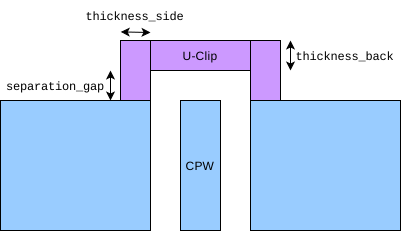
Parameters used in the U-clip. The orange portion is the optional single-element RF port (arrow indicating excitation direction).
- Parameters:
qObjName (float) – Name of the LauncherWB Q-Component in the Qiskit-Metal design.
thickness_side (float) – Distance the U-clip, in metres, goes into the ground plane from the edge. Defaults to 20e-6.
thickness_back (float) – Thickness of the furthest section from the chip (but also parallel with the chip) in metres. Defaults to 20e-6
separation_gap (float) – Distance of the section parallel with the chip from the edge of the chip in metres. The default value is set to zero whereupon, it will use the gap distance of the CPW.
- create_current_source_with_Uclip_on_Route(route_name: str, pin_name: str, thickness_side: float = 2e-05, thickness_back: float = 2e-05, separation_gap: float = 2e-05)
Applies Qiskit-Metal designs only
Create a U-Clip that adjoins the two ground planes on a CPW route feeding from the edge of the chip. That is, a metallic piece (that is coplanar with the CPW) goes off the chip and comes around to join the two ground planes. It is a simple concave octogan with 90° corners. It can also have an optional RF port.
This function must be run before calling
prepare_simulation().
Parameters used in the U-clip. The orange portion is the optional single-element RF port (arrow indicating excitation direction).
- Parameters:
route_name (str) – Name of the routing component (e.g. a CPW) in the Qiskit-Metal design
pin_name (str) – Name of the pin within the routing component in the Qiskit-Metal design. Typically a routing component has, at least, two pins named something like ‘start’ and ‘end’.
thickness_side (float) – Distance the U-clip, in metres, goes into the ground plane from the edge. Defaults to 20e-6.
thickness_back (float) – Thickness of the furthest section from the chip (but also parallel with the chip) in metres. Defaults to 20e-6
separation_gap (float) – Distance of the section parallel with the chip from the edge of the chip in metres. The default value is set to zero whereupon, it will use the gap distance of the CPW.
- default_user_options = {'HPC_Parameters_JSON': '', 'solns_to_save': -1, 'solver_maxits': 100, 'solver_order': 2, 'solver_tol': 1e-08}
- prepare_simulation()
Creates and saves the GMSH (.msh) and Palace configuration file (.json).
- retrieve_data()
Retrieves flux per
Creates and saves B-field plots due to the different terminal injections (input1_normB.png and input1_normBz.png), and mesh (mesh.png)
This function must be run after calling
run().- Returns:
The flux per unit current (that is, Wb/A) through the different integration surfaces due to the different terminal current injections. If no surfaces are specified, then it just returns the dictionary specified in the function
retrieve_magnetostatic_data_from_file().
- retrieve_magnetostatic_data()
- static retrieve_magnetostatic_data_from_file(output_directory)
- simPC_parent_simulation_dir = '/home/experiment/PALACE/Simulations/input'