Palace Simulation Base classes
These classes are inherited in the Palace simulation classes.
- class PALACE_Model_Base(sim_parent_directory, meshing: str, mode: str, options: dict, **kwargs)
Bases:
objectBase class for PALACE simulation classes.
- Parameters:
sim_parent_directory (str) – The directory in which to store simulation results. Ensure it ends with a slash.
meshing (str) – The meshing engine to use. It can be either ‘GMSH’ or ‘COMSOL’ with the latter requiring a local COMSOL installation.
mode (str) – Either ‘PC’ to run locally or ‘HPC’ to just generate the scripts to be run on a cluster/computer later.
options (dict) –
One must supply one of these keyword arguments depending on the input format of the design to simulate:
'metal_design'(QDesign):The Qiskit-Metal design object to simulate
'gds_design'(str):Path to the GDS file with the design to simulate
Additional options which include those of the daughter classes and:
'dielectric_material'(str):Name of the dielectric to use on the substrate
'fillet_resolution'(float):All curved sections of paths (e.g. a CPW line) will be discretised into line segments. This value is the number of such segments observed over a 90° arc.
'mesh_min'(float):The default minimum mesh element size to use when using the fine-meshing functions.
'mesh_max'(float):The default maximum mesh element size to use when using the fine-meshing functions.
'taper_dist_min'(float):The default distance to which the size of the mesh elements remain at mesh_min.
'taper_dist_max'(float):The default distance to which the size of the mesh elements begin to be set at mesh_max.
'threshold'(float):The default threshold (in metres) to which elements in a given layer are simplified. That is, adjacent vertices that are closer than this value are simplified into a single vertex.
'fuse_threshold'(float):The default threshold (in metres) to which cracks are bridged together. Gaps that are twice this value are effectively bridged together so that there are no seams etc.
'simplify_edge_min_angle_deg'(float):The default simplification used to delete unnecessary vertices when they are adjacent and collinear. It weights them based on the distance from the central vertex. For example, consider three vertices ABC. If AB and BC are equidistant and the angle ABC is less than the supplied value, then B is removed as it is considered collinear. If the length of AB is greater than BC, then the ratio of the lengths R is multiplied by the angle ABC before checking for this threshold. That is, if there is a genuine sharp feature, it is not simplified. This is mostly designed for curved edges that may have an unnecessary number of vertices.
'gmsh_verbosity'(int):The default level of messages to print from GMSH. The levels symbolised by the integers are: Nothing (0), Errors (1), Warnings (2), Direct (3), Information (4), Status (5), Debug (99). The verbosity of the messages increase with the listed levels.
'gmsh_dist_func_discretisation'(int):When a path or polygon is given for a fine-mesh field, GMSH needs to compute distances from these 1D or 2D regions in order to compute the mesh element size at a given location. Thus, it must be able to numerically approximate these lines/polygons. It does so by chopping every line-segment or polygon into smaller portions given by this supplied value. Note that making this too large will make the generation of the mesh slower as it will take longer to compute all the mesh field distances.
'palace_mode'(str):When running Palace locally, one may run it via a ‘local’ installation (e.g. Mac-OS, Linux etc.) or ‘wsl’ (e.g. Windows).
'palace_dir'(str):When running Palace locally, the location of the Palace binary must be supplied so that SQDMetal can call it directly.
'palace_wsl_spack_repo_directory'(str):When running Palace in WSL (i.e. Windows), the location of the cloned repository (inside the WSL VM) needs to be supplied unless it is in the default ‘~/repo’ folder.
'comsol_meshing'(str):The default meshing size to use if using COMSOL to mesh the simulation. Acceptable values are: Can be: ‘Extremely fine’, ‘Extra fine’, ‘Finer’, ‘Fine’, ‘Normal’, ‘Coarse’, ‘Coarser’, ‘Extra coarse’ or ‘Extremely coarse’.
- Return type:
The constructed PALACE_Model_Base object.
- add_ground_plane(**kwargs)
Applies Qiskit-Metal designs only
Adds metallic ground-plane from the Qiskit-Metal design object onto the surface layer of the chip simulation.
This function must be run before calling
prepare_simulation().- Parameters:
kwargs (dict) –
Optional argument:
'threshold'(float):Defaults to -1 (i.e. no threshold). This is the threshold in metres, below which consecutive vertices along a given polygon are combined into a single vertex. This simplification helps with meshing as the engine will not overdo the meshing. If this argument is negative, the argument is ignored.
- add_metallic(layer_id, **kwargs)
Adds metallic conductors from the design input onto the surface layer of the chip simulation. If the particular layer has fancy PVD evaporation steps, the added metallic layer will account for said steps and merge the final result. In addition, all metallic contiguous elements are merged into single blobs.
This function must be run before calling
prepare_simulation().- Parameters:
layer_id (int) – The layer ID containing the metallic layer to add.
kwargs (dict) –
Optional arguments:
'threshold'(float):Defaults to -1 (i.e. no threshold). This is the threshold in metres, below which consecutive vertices along a given polygon are combined into a single vertex. This simplification helps with meshing as the engine will not overdo the meshing. If this argument is negative, the argument is ignored.
'fuse_threshold'(float):Defaults to 1e-12. This is the minimum distance between metallic elements, below which they are considered to be a single polygon and thus, the polygons are merged with the gap filled. This accounts for floating-point errors that make adjacent elements fail to merge as a single element, due to infinitesimal gaps between them.
'evap_mode'(str):Defaults to ‘separate_delete_below’. These are the methods upon which to separate or merge overlapping elements across multiple evaporation steps. See documentation on PVD_Shadows for more details on the available options. If set to
None, then the plain mask/metallic region is taken with no regard to the PVD profiles.
'group_by_evaporations'(bool):Defaults to False. If set to True, if elements on a particular evaporation step are separated due to the given evap_mode, they will still be selected as a part of the same conductor (useful for example, in capacitance matrix simulations).
'evap_trim'(float):Defaults to 20e-9. This is the trimming distance used in certain evap_mode profiles. See documentation on PVD_Shadows for more details on its definition.
If using GDS inputs:
'cell_index'(int):Defaults to 0. This specifies the cell from which the layer is to be extracted.
- create_batch_file()
- default_user_options_parent = {'comsol_meshing': 'Extremely fine', 'dielectric_material': 'silicon', 'fillet_resolution': 12, 'fuse_threshold': 1e-09, 'gmsh_dist_func_discretisation': 120, 'gmsh_verbosity': 1, 'mesh_max': 0.0001, 'mesh_min': 1e-05, 'palace_dir': '', 'palace_mode': 'local', 'palace_wsl_spack_repo_directory': '~/repo', 'simplify_edge_min_angle_deg': -1, 'taper_dist_max': 0.0002, 'taper_dist_min': 3e-05, 'threshold': 1e-09, 'topping_material': 'vacuum'}
- enable_mesh_refinement(num_iterations: int, max_DoFs: int = 0, tolerance: float = 0.01, Dorfler_marking_fraction: float = 0.7, save_iterations_data: bool = True, save_iterations_mesh: bool = False, nonconformal: bool = True)
Enable automatic mesh refinement (AMR) when simulating the model. See further details in the AWS Palace reference. Some of the parameter definitions have been copied from this reference.
This function must be run before calling
prepare_simulation().- Parameters:
num_iterations (int) – Number of AMR iterations to run. Each simulation is run and stored in a new sub-folder as the mesh is refined during each iteration.
max_DoFs (int) – If set to a value above zero, the AMR iterations will cease to refine the mesh upon reaching this value for DoF (degrees of freedom). If set to zero (default value), then there is no limit to the maximum DoF (ultimately limited by RAM).
tolerance (float) – Relative error convergence tolerance for adaptive mesh refinement (AMR). Defaults to 1e-2.
Dorfler_marking_fraction (float) – Dörfler marking fraction used to specify which elements to refine. It defines smallest number of elements that make up this fractional value to the total error in the mesh. A larger value will refine more elements per iteration, at the cost of the final mesh being less efficient. Default value is 0.7.
save_iterations_data (bool) – If True, the simulation output is stored for every AMR iteration. Defaults to True.
save_iterations_mesh (bool) – If True, the mesh is stored for every AMR iteration. Defaults to True.
nonconformal (bool) – Selects whether AMR should use nonconformal refinement. Nonconformal refinement is required for “non-simplex meshes”. Somewhat required even if the seed mesh is conformal. Thus, the default value is True.
- Return type:
Returns nothing.
- enforce_full_3D_simulation(metal_thickness: float, substrate_trenching: float = 0.0)
Enable a full 3D simulation where the metals have a vertical thickness and dielectric gaps can be trenched. If this function is not called, then the simulations will be quasi-3D in which the metals are deemed to be infinitesimally thin and thus, approximated as planar sheets on the surface of the 3D substrate.
This function must be run before calling
prepare_simulation().- Parameters:
metal_thickness (float) – Thickness of the metals in metres. Can be zero.
substrate_trenching (float) – Depth of the trenches (of the dielectric gaps relative to the bottom of the metals) in metres. Default value is 0.0.
- Return type:
Returns nothing.
- fine_mesh_along_path(dist_resolution: float, qObjName: str, trace_name: str = '', **kwargs)
Applies Qiskit-Metal designs only
Mesh finely around the areas surrounding a Qiskit-Metal path object. This is useful with features like a CPW.
This function must be run before calling
prepare_simulation().- Parameters:
dist_resolution (float) – Distance in metres to which the curve is numerically approximated before passing into Gmsh. That is, the curves will be approximated by this segmentation distance.
qObjName (str) – The name of the Qiskit-Metal QComponent object that contains said path.
trace_name (str) – The trace name within the QComponent object. If left at the default blank string ‘’, the path will be automatically inferred.
kwargs (dict) –
There are additional options that may be supplied:
'mesh_min'(float):The default minimum mesh element size to use when using the fine-meshing functions. If it is not supplied, the default value from the user options will be taken.
'mesh_max'(float):The default maximum mesh element size to use when using the fine-meshing functions. If it is not supplied, the default value from the user options will be taken.
'taper_dist_min'(float):The default distance to which the size of the mesh elements remain at mesh_min. If it is not supplied, the default value from the user options will be taken.
'taper_dist_max'(float):The default distance to which the size of the mesh elements begin to be set at mesh_max. If it is not supplied, the default value from the user options will be taken.
- Return type:
Returns nothing.
- fine_mesh_around_comp_boundaries(list_comp_names, **kwargs)
- fine_mesh_components(list_comp_names: list[str], **kwargs)
Applies Qiskit-Metal designs only
Mesh finely within the boundaries of a given list of components.
This function must be run before calling
prepare_simulation().- Parameters:
list_comp_names (list[str]) – Names of the components (over which the regions are to be finely meshed) given as a list of strings.
kwargs (dict) –
There are additional options that may be supplied:
'metals_only'(bool):If set to True (defaults to False), only the metallic regions are selected for fine-meshing. Otherwise, the entire components (i.e. both dielectric gaps as well as the metallic regions) are selected.
'mesh_min'(float):The default minimum mesh element size to use when using the fine-meshing functions. If it is not supplied, the default value from the user options will be taken.
'mesh_max'(float):The default maximum mesh element size to use when using the fine-meshing functions. If it is not supplied, the default value from the user options will be taken.
'taper_dist_min'(float):The default distance to which the size of the mesh elements remain at mesh_min. If it is not supplied, the default value from the user options will be taken.
'taper_dist_max'(float):The default distance to which the size of the mesh elements begin to be set at mesh_max. If it is not supplied, the default value from the user options will be taken.
- Return type:
Returns nothing.
- fine_mesh_features(max_feature_size: float, **kwargs)
Automatically detect the finer features on the device and select them to be meshed finely. Fine features are defined as fingers/slivers that have a particular feature width. For example, the feature size of a CPW line would be its conductor width.
This function must be run before calling
prepare_simulation().- Parameters:
max_feature_size (float) – Maximum feature size in metres; any feature below this size will be selected automatically for fine meshing.
kwargs (dict) –
There are additional options that may be supplied:
'mesh_min'(float):The default minimum mesh element size to use when using the fine-meshing functions. If it is not supplied, the default value from the user options will be taken.
'mesh_max'(float):The default maximum mesh element size to use when using the fine-meshing functions. If it is not supplied, the default value from the user options will be taken.
'taper_dist_min'(float):The default distance to which the size of the mesh elements remain at mesh_min. If it is not supplied, the default value from the user options will be taken.
'taper_dist_max'(float):The default distance to which the size of the mesh elements begin to be set at mesh_max. If it is not supplied, the default value from the user options will be taken.
- Return type:
Returns nothing.
- fine_mesh_in_rectangle(x1: float, y1: float, x2: float, y2: float, **kwargs)
Fine mesh a rectangular region.
This function must be run before calling
prepare_simulation().- Parameters:
x1 (float) – Minimum x-boundary of the rectangle (in metres).
x2 (float) – Maximum x-boundary of the rectangle (in metres).
y1 (float) – Minimum y-boundary of the rectangle (in metres).
y2 (float) – Maximum y-boundary of the rectangle (in metres).
kwargs (dict) –
There are additional options that may be supplied:
'mesh_min'(float):The default minimum mesh element size to use when using the fine-meshing functions. If it is not supplied, the default value from the user options will be taken.
'mesh_max'(float):The default maximum mesh element size to use when using the fine-meshing functions. If it is not supplied, the default value from the user options will be taken.
'taper_dist_min'(float):The default distance to which the size of the mesh elements remain at mesh_min. If it is not supplied, the default value from the user options will be taken.
'taper_dist_max'(float):The default distance to which the size of the mesh elements begin to be set at mesh_max. If it is not supplied, the default value from the user options will be taken.
- Return type:
Returns nothing.
- open_mesh_gmsh()
Note that if this is used in a Notebook environment, it’ll be a blocking function until the Gmsh GUI is closed…
- prepare_simulation()
Creates the JSON and mesh files as relevant to the defined Palace simulation. The model will have everything required to run the simulation either externally via command line or internally using
run().
- retrieve_data()
Retrieves relevant data after running the current simulation. Note that this is only relevant when using
run()to run the simulation locally. In addition, the daughter class must override this function to actually retrieve and return data relevant to the simulation.- Return type:
Returns data relevant to the simulation; if this function is not overridden, nothing if returned.
- retrieve_simulation_sizes()
Retrieves simulation sizes after running the current simulation. Note that this is only relevant when using
run()to run the simulation locally.- Returns:
sizes – The simulation sizes are given via the following keys:
'DoF'(int):Degrees of Freedom used in this simulation run.
'MeshElements'(int):Number of mesh elements used in this simulation run.
- Return type:
dict
- static retrieve_simulation_sizes_from_file(path_palace_json: str)
Retrieves simulation sizes by scanning the stored output of a previou run simulation.
- Parameters:
path_palace_json (str) – File path (either relative or absolute) to the palace.json file generated when completing a simulation.
- Returns:
sizes – The simulation sizes are given via the following keys:
'DoF'(int):Degrees of Freedom used in this simulation run.
'MeshElements'(int):Number of mesh elements used in this simulation run.
- Return type:
dict
- run(**kwargs)
Runs the PALACE simulation locally either via a local installation, WSL or a container VM depending on the configuration.
- set_local_output_subdir(name)
Sets a subdirectory within the simulation directory so that when
run()is called, the simulation output is placed within this subdirectory. For example, this is useful when running the same model, but varying the frequency range through which it is swept (i.e. no changes to geometry, mesh etc.). This function sets the subdirectory by modifying the simulation JSON file that is used by the Palace simulations when callingrun()- Parameters:
name (str) – Name of the subdirectory.
- set_xBoundary_as_absolute(x_neg, x_pos)
Set the distances of the chip to the air-box on both its boundaries along the x-axis.
This function must be run before calling
prepare_simulation().- Parameters:
x_neg (float) – Distance of the chip to the air-box (in metres) on the negative x-axis side.
x_pos (float) – Distance of the chip to the air-box (in metres) on the positive x-axis side.
- set_xBoundary_as_proportion(x_prop: float)
Set the distance of the chip to the air-box on both its boundaries along the x-axis. The distance is given as a proportion of the chip size along the x-axis.
This function must be run before calling
prepare_simulation().- Parameters:
x_prop (float) – Proportion of the chip size along the x-axis to use when separating the chip from the air-box on both sides along the x-axis.
- set_yBoundary_as_absolute(y_neg, y_pos)
Set the distances of the chip to the air-box on both its boundaries along the y-axis.
This function must be run before calling
prepare_simulation().- Parameters:
y_neg (float) – Distance of the chip to the air-box (in metres) on the negative y-axis side.
y_pos (float) – Distance of the chip to the air-box (in metres) on the positive y-axis side.
- set_yBoundary_as_proportion(y_prop: float)
Set the distance of the chip to the air-box on both its boundaries along the y-axis. The distance is given as a proportion of the chip size along the y-axis.
This function must be run before calling
prepare_simulation().- Parameters:
y_prop (float) – Proportion of the chip size along the y-axis to use when separating the chip from the air-box on both sides along the y-axis.
- set_zBoundary_as_absolute(z_neg, z_pos)
Set the distances of the chip to the air-box on both its boundaries along the z-axis.
This function must be run before calling
prepare_simulation().- Parameters:
z_neg (float) – Distance of the chip to the air-box (in metres) on the negative z-axis side.
z_pos (float) – Distance of the chip to the air-box (in metres) on the positive z-axis side.
- set_zBoundary_as_proportion(z_prop_top: float, z_prop_bottom: float)
Set the distance of the chip to the air-box on both its boundaries along the z-axis. The distances are given as a proportion of the chip size along the z-axis.
This function must be run before calling
prepare_simulation().- Parameters:
z_prop_top (float) – Proportion of the chip thickness (i.e. along z-axis) to use when separating the top of the chip to the top ceiling of the air-box.
z_prop_bottom (float) – Proportion of the chip thickness (i.e. along z-axis) to use when separating the bottom of the chip to the bottom floor of the air-box.
- class PALACE_Model_Base_RF(sim_parent_directory, meshing: str, mode: str, options: dict, **kwargs)
Bases:
PALACE_Model_BaseBase class for PALACE simulation classes.
- Parameters:
sim_parent_directory (str) – The directory in which to store simulation results. Ensure it ends with a slash.
meshing (str) – The meshing engine to use. It can be either ‘GMSH’ or ‘COMSOL’ with the latter requiring a local COMSOL installation.
mode (str) – Either ‘PC’ to run locally or ‘HPC’ to just generate the scripts to be run on a cluster/computer later.
options (dict) –
One must supply one of these keyword arguments depending on the input format of the design to simulate:
'metal_design'(QDesign):The Qiskit-Metal design object to simulate
'gds_design'(str):Path to the GDS file with the design to simulate
Additional options which include those of the daughter classes and:
'dielectric_material'(str):Name of the dielectric to use on the substrate
'fillet_resolution'(float):All curved sections of paths (e.g. a CPW line) will be discretised into line segments. This value is the number of such segments observed over a 90° arc.
'mesh_min'(float):The default minimum mesh element size to use when using the fine-meshing functions.
'mesh_max'(float):The default maximum mesh element size to use when using the fine-meshing functions.
'taper_dist_min'(float):The default distance to which the size of the mesh elements remain at mesh_min.
'taper_dist_max'(float):The default distance to which the size of the mesh elements begin to be set at mesh_max.
'threshold'(float):The default threshold (in metres) to which elements in a given layer are simplified. That is, adjacent vertices that are closer than this value are simplified into a single vertex.
'fuse_threshold'(float):The default threshold (in metres) to which cracks are bridged together. Gaps that are twice this value are effectively bridged together so that there are no seams etc.
'simplify_edge_min_angle_deg'(float):The default simplification used to delete unnecessary vertices when they are adjacent and collinear. It weights them based on the distance from the central vertex. For example, consider three vertices ABC. If AB and BC are equidistant and the angle ABC is less than the supplied value, then B is removed as it is considered collinear. If the length of AB is greater than BC, then the ratio of the lengths R is multiplied by the angle ABC before checking for this threshold. That is, if there is a genuine sharp feature, it is not simplified. This is mostly designed for curved edges that may have an unnecessary number of vertices.
'gmsh_verbosity'(int):The default level of messages to print from GMSH. The levels symbolised by the integers are: Nothing (0), Errors (1), Warnings (2), Direct (3), Information (4), Status (5), Debug (99). The verbosity of the messages increase with the listed levels.
'gmsh_dist_func_discretisation'(int):When a path or polygon is given for a fine-mesh field, GMSH needs to compute distances from these 1D or 2D regions in order to compute the mesh element size at a given location. Thus, it must be able to numerically approximate these lines/polygons. It does so by chopping every line-segment or polygon into smaller portions given by this supplied value. Note that making this too large will make the generation of the mesh slower as it will take longer to compute all the mesh field distances.
'palace_mode'(str):When running Palace locally, one may run it via a ‘local’ installation (e.g. Mac-OS, Linux etc.) or ‘wsl’ (e.g. Windows).
'palace_dir'(str):When running Palace locally, the location of the Palace binary must be supplied so that SQDMetal can call it directly.
'palace_wsl_spack_repo_directory'(str):When running Palace in WSL (i.e. Windows), the location of the cloned repository (inside the WSL VM) needs to be supplied unless it is in the default ‘~/repo’ folder.
'comsol_meshing'(str):The default meshing size to use if using COMSOL to mesh the simulation. Acceptable values are: Can be: ‘Extremely fine’, ‘Extra fine’, ‘Finer’, ‘Fine’, ‘Normal’, ‘Coarse’, ‘Coarser’, ‘Extra coarse’ or ‘Extremely coarse’.
- Return type:
The constructed PALACE_Model_Base object.
- add_kinetic_inductance(kinetic_inductance: float)
Enables kinetic inductance in the metals used in the simulations. See the AWS Palace documentation for further details.
This function must be run before calling
prepare_simulation().- Parameters:
kinetic_inductance (float) – The value of the kinetic inductance (given as a surface inductance in units of H/□), to use on the metallic regions.
- create_CPW_feed_Uclip_on_Launcher(qObjName: str, thickness_side: float = 2e-05, thickness_back: float = 2e-05, separation_gap: float = 2e-05, add_port=False, impedance_R: float = 50, impedance_L: float = 0, impedance_C: float = 0)
Applies Qiskit-Metal designs only
Create a U-Clip that adjoins the two ground planes on a CPW launcher feeding from the edge of the chip. That is, a metallic piece (that is coplanar with the CPW) goes off the chip and comes around to join the two ground planes. It is a simple concave octogan with 90° corners. It can also have an optional RF port.
This function must be run before calling
prepare_simulation().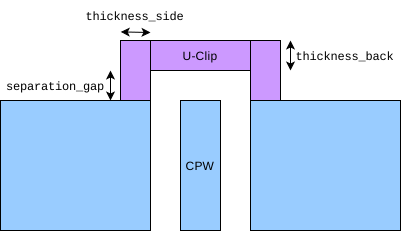
Parameters used in the U-clip. The orange portion is the optional single-element RF port (arrow indicating excitation direction).
- Parameters:
qObjName (float) – Name of the LauncherWB Q-Component in the Qiskit-Metal design.
thickness_side (float) – Distance the U-clip, in metres, goes into the ground plane from the edge. Defaults to 20e-6.
thickness_back (float) – Thickness of the furthest section from the chip (but also parallel with the chip) in metres. Defaults to 20e-6
separation_gap (float) – Distance of the section parallel with the chip from the edge of the chip in metres. The default value is set to zero whereupon, it will use the gap distance of the CPW.
add_port (bool) – If
True, create a RF single-element port that feeds the CPW from the grounded Uclip.impedance_R (float) – Resistive component of this port’s impedance given in Ohm (Ω). Defaults to 50. Only relevant when
add_port=True.impedance_L (float) – Inductive component of this port’s impedance given in Henry (H). Defaults to 0. Only relevant when
add_port=True.impedance_C (float) – Capacitive component of this port’s impedance given in Farad (F). Defaults to 0. Only relevant when
add_port=True.
- create_CPW_feed_Uclip_on_Route(route_name: str, pin_name: str, thickness_side: float = 2e-05, thickness_back: float = 2e-05, separation_gap: float = 2e-05, add_port=False, impedance_R: float = 50, impedance_L: float = 0, impedance_C: float = 0)
Applies Qiskit-Metal designs only
Create a U-Clip that adjoins the two ground planes on a CPW route feeding from the edge of the chip. That is, a metallic piece (that is coplanar with the CPW) goes off the chip and comes around to join the two ground planes. It is a simple concave octogan with 90° corners. It can also have an optional RF port.
This function must be run before calling
prepare_simulation().
Parameters used in the U-clip. The orange portion is the optional single-element RF port (arrow indicating excitation direction).
- Parameters:
route_name (str) – Name of the routing component (e.g. a CPW) in the Qiskit-Metal design
pin_name (str) – Name of the pin within the routing component in the Qiskit-Metal design. Typically a routing component has, at least, two pins named something like ‘start’ and ‘end’.
thickness_side (float) – Distance the U-clip, in metres, goes into the ground plane from the edge. Defaults to 20e-6.
thickness_back (float) – Thickness of the furthest section from the chip (but also parallel with the chip) in metres. Defaults to 20e-6
separation_gap (float) – Distance of the section parallel with the chip from the edge of the chip in metres. The default value is set to zero whereupon, it will use the gap distance of the CPW.
add_port (bool) – If
True, create a RF single-element port that feeds the CPW from the grounded Uclip.impedance_R (float) – Resistive component of this port’s impedance given in Ohm (Ω). Defaults to 50. Only relevant when
add_port=True.impedance_L (float) – Inductive component of this port’s impedance given in Henry (H). Defaults to 0. Only relevant when
add_port=True.impedance_C (float) – Capacitive component of this port’s impedance given in Farad (F). Defaults to 0. Only relevant when
add_port=True.
- create_port_2_conds(qObjName1: str, pin1: str, qObjName2: str, pin2: str, rect_width: float = 2e-05, impedance_R: float = 50, impedance_L: float = 0, impedance_C: float = 0)
Applies Qiskit-Metal designs only
Create a RF port feed across two metallic conductors by using pins as the referential starting and ending points. Note that the first resistive port will automatically be the 50Ohm excitation port in the E-field plots while the second port is a 50Ohm ground. The s-parameters will calculate S11 and S21 if 2 such ports are defined.
This function must be run before calling
prepare_simulation().- Parameters:
qObjName1 (str) – Name of the Qiskit-Metal QComponent that contains the first pin.
pin1 (str) – Name of the pin within the first Qiskit-Metal QComponent qObjName1.
qObjName2 (str) – Name of the Qiskit-Metal QComponent that contains the second pin.
pin2 (str) – Name of the pin within the second Qiskit-Metal QComponent qObjName2.
rect_width (float) – Width of the port in metres. Defaults to 20e-6.
impedance_R (float) – Resistive component of this port’s impedance given in Ohm (Ω). Defaults to 50.
impedance_L (float) – Inductive component of this port’s impedance given in Henry (H). Defaults to 0.
impedance_C (float) – Capacitive component of this port’s impedance given in Farad (F). Defaults to 0.
- create_port_CPW_on_Launcher(qObjName: str, len_launch: float = 2e-05, impedance_R: float = 50, impedance_L: float = 0, impedance_C: float = 0)
Applies Qiskit-Metal designs only
Creates an RF port on a LauncherWB object. The elements form fins to ground from the central CPW stripline. Note that the first resistive port will automatically be the 50Ohm excitation port in the E-field plots while the second port is a 50Ohm ground. The s-parameters will calculate S11 and S21 if 2 such ports are defined.
This function must be run before calling
prepare_simulation().- Parameters:
qObjName (str) – Name of the Qiskit-Metal LauncherWB object that feeds the CPW.
len_launch (float) – Length of the inlet port fins along the the CPW in metres. It is a good idea to keep it thin w.r.t. CPW gap. Default value is 20e-6.
impedance_R (float) – Resistive component of this port’s impedance given in Ohm (Ω). Defaults to 50.
impedance_L (float) – Inductive component of this port’s impedance given in Henry (H). Defaults to 0.
impedance_C (float) – Capacitive component of this port’s impedance given in Farad (F). Defaults to 0.
- create_port_CPW_on_Route(qObjName: str, pin_name: str = 'end', len_launch: float = 2e-05, impedance_R: float = 50, impedance_L: float = 0, impedance_C: float = 0)
Applies Qiskit-Metal designs only
Creates an RF port on a CPW inlet based on a CPW routing object in Qiskit-Metal. The elements form fins to ground from the central CPW stripline. Note that the first resistive port will automatically be the 50Ohm excitation port in the E-field plots while the second port is a 50Ohm ground. The s-parameters will calculate S11 and S21 if 2 such ports are defined.
This function must be run before calling
prepare_simulation().- Parameters:
qObjName (str) – Name of the Qiskit-Metal CPW object that has the attributes: start, end, width, gap
pin_name (str) – Name of the pin on which, the feed port is created. It defaults to ‘end’ in which case the port feed will be set on the ending pin.
len_launch (float) – Length of the inlet port fins along the the CPW in metres. It is a good idea to keep it thin w.r.t. CPW gap. Default value is 20e-6.
impedance_R (float) – Resistive component of this port’s impedance given in Ohm (Ω). Defaults to 50.
impedance_L (float) – Inductive component of this port’s impedance given in Henry (H). Defaults to 0.
impedance_C (float) – Capacitive component of this port’s impedance given in Farad (F). Defaults to 0.
- create_port_CPW_via_edge_point(pt_near_centre_end: list | ndarray | tuple, len_launch: float, impedance_R: float = 50, impedance_L: float = 0, impedance_C: float = 0, **kwargs)
Creates an RF port on a CPW inlet. The edge of the CPW is found automatically by taking the edge closest to a reference point. The elements form fins to ground from the central CPW stripline. Note that the first resistive port will automatically be the 50Ohm excitation port in the E-field plots while the second port is a 50Ohm ground. The s-parameters will calculate S11 and S21 if 2 such ports are defined.
This function must be run before calling
prepare_simulation().- Parameters:
pt_near_centre_end (list|np.ndarray|tuple) – A coordinate (x,y) used as a reference. It should be as near as possible to the end of the central conductor of the CPW section.
len_launch (float) – Length of the inlet port fins along the the CPW in metres. It is a good idea to keep it thin w.r.t. CPW gap. Default value is 20e-6.
impedance_R (float) – Resistive component of this port’s impedance given in Ohm (Ω). Defaults to 50.
impedance_L (float) – Inductive component of this port’s impedance given in Henry (H). Defaults to 0.
impedance_C (float) – Capacitive component of this port’s impedance given in Farad (F). Defaults to 0.
kwargs (dict) –
Optional arguments given as the design needs to be rendered/compiled in order to find the nearest edge for a CPW:
'threshold'(float):The default threshold (in metres) to which elements in a given layer are simplified. That is, adjacent vertices that are closer than this value are simplified into a single vertex. Defaults to that given in user options.
'fuse_threshold'(float):The default threshold (in metres) to which cracks are bridged together. Gaps that are twice this value are effectively bridged together so that there are no seams etc. Defaults to that given in user options.
- create_port_JosephsonJunction(qObjName: str, **kwargs)
Applies Qiskit-Metal designs only
Creates a Josephson junction simulation construction in the form of a lumped inductance over a rectangular region specified by a ‘junction’ type within the Qiskit-Metal (a region that would otherwise be ignored when rendering metallic regions). There can be multiple such ‘junction’ constructs within the Qiskit-Metal objects that one may choose to create the lumped inductance in the simulation.
This function must be run before calling
prepare_simulation().- Parameters:
qObjName (str) – Qiskit-Metal object that contains a ‘junction’ construct over which a Josephson junction is to be created
kwargs (dict) –
Keyword arguments:
'junction_index'(int):In the case of multiple ‘junction’ constructs contained within the Qiskit-Metal object (named qObjName), the index can be used to select different ones. Default value is 0 (i.e. first one in the list when enumerating said ‘junction’ constructs).
'E_J_Hertz'(float):Energy of the Josephson junction E_J given in Hertz (Hz).
'L_J'(float):Inductance of the Josephson junction given in Henry (H).
'C_J'(float):A parallel capacitance across the Josephson junction given in Farad (F). Defaults to 0.
Note
Either one of
'E_J_Hertz'or'L_J'must be specified.The function only creates one Josephson junction per function call, use the
'junction_index'parameter to create more.A parallel capacitance
'C_J'can be used to simulate the small capacitance across the junction pads. Note that there is no resistive component.
- create_waveport_on_boundary(plane: str, **kwargs)
Creates a RF wave port feed on a plane on the surface of the airbox.
This function must be run before calling
prepare_simulation().- Parameters:
plane (str) – The plane on the air-box surface upon which the wave-port feed is to be placed. Can be ‘x_pos’ or ‘x_neg’ for the positive and negative planes along the x-axis. Can also be ‘y_pos’ or ‘y_neg’ for the positive and negative planes along the y-axis. Similarly it can be ‘z_pos’ or ‘z_neg’ for the positive and negative planes along the z-axis.
kwargs (dict) –
Keyword arguments:
'x'(float):x-coordinate of the centre of the port
'y'(float):y-coordinate of the centre of the port
'z'(float):z-coordinate of the centre of the port
'shape'(float):Shape of the waveport. Currently only supports ‘rectangle’ (the default value).
Note
If
'plane'is ‘x_pos’/’x_neg’, only'y'and'z'must be supplied (not'x')If
'plane'is ‘y_pos’/’y_neg’, only'x'and'z'must be supplied (not'y')If
'plane'is ‘z_pos’/’z_neg’, only'x'and'y'must be supplied (not'z')That is, the port will be coplanar with the
'plane'on the air-box surface.
- set_farfield(ff_type: str = 'pec', ff_plane: str = '', ff_material: MaterialConductor = None)
Sets the farfield type to use on the air-box.
This function must be run before calling
prepare_simulation().- Parameters:
ff_type (str) – Far-field type being either ‘pec’ (perfect electrical conductor), ‘absorbing’ (the EM-waves do not reflect on these boundaries and continue onwards indefinitely) or ‘conductor’ (similar to PEC, but with a finite conductivity)
ff_plane (str) – Apply the parameters to one of the 6 planes forming the air-box. A given positive/negative plane along a given axis is specified via any of: ‘x_pos’, ‘x_neg’, ‘y_pos’, ‘y_neg’, ‘z_pos’, ‘z_neg’. The default value is an empty string ‘’, in which case, the attributes are applied to all surfaces of the air-box.
ff_material (MaterialConductor) – If ff_type is ‘conductor’, then one must supply a MaterialConductor object to represent the material that forms the conductor on the given plane(s). Otherwise, the default value is None and this field is ignored.
- set_port_impedance(port_ind: int, impedance_R: float = 50, impedance_L: float = 0, impedance_C: float = 0)
Sets the port impedances (i.e. R, L and C values) for a port that has already been defined. This function can be run after calling
prepare_simulation(), in which case it will update the JSON file so that it is accounted when running the simulation.- Parameters:
port_ind (int) – Port index enumerated from 1. This port index must exist (i.e. at least port_ind-many RF port feeds must be defined)
impedance_R (float) – Resistive component of this port’s impedance given in Ohm (Ω). Defaults to 50.
impedance_L (float) – Inductive component of this port’s impedance given in Henry (H). Defaults to 0.
impedance_C (float) – Capacitive component of this port’s impedance given in Farad (F). Defaults to 0.
- setup_EPR_interfaces(substrate_air: MaterialInterface, substrate_metal: MaterialInterface, metal_air: MaterialInterface, **kwargs)
Set the interface materials to trigger EPR (energy participation ratio) loss calculations. See the AWS Palace documentation for further details
This function must be run before calling
prepare_simulation().- Parameters:
substrate_air (MaterialInterface) – The material for the substrate-air interface on the surface of the chip.
substrate_metal (MaterialInterface) – The material for the substrate-metal interface on the surface of the chip.
metal_air (MaterialInterface) – The material for the metal-air interface on the surface of the chip.
kwargs (dict) –
Keyword arguments:
'substrate_air_thickness'(float):Thickness to use in the EPR loss calculation for the substrate-air interface in metres. Defaults to 2e-9.
'substrate_metal_thickness'(float):Thickness to use in the EPR loss calculation for the substrate-metal interface in metres. Defaults to 2e-9.
'metal_air_thickness'(float):Thickness to use in the EPR loss calculation for the metal-air interface in metres. Defaults to 2e-9.